Disposable Email
for AI Agents
Create inboxes and read email via REST API or MCP.
No browser. No passwords. Just an API key.
$ curl -sX POST https://emptyinbox.me/api/auth/register \
    -H 'Content-Type: application/json' -d '{}'
{ "api_key": "...", "inbox_quota": 5 }
$ npx emptyinbox-mcp
Registers on first run. No API key to paste.
Built for headless automation
Six capabilities your agent needs to handle email — from inbox creation to OTP extraction — without touching a browser.
OpenAPI & GPT Actions
Import the spec directly into OpenAI GPTs, LangChain, CrewAI, or any OpenAPI-compatible framework — instant integration.
Email Polling
Wait for a verification email, then extract the code — one MCP call handles the full OTP flow. Your agent stays unblocked.
API Key Auth
One static key works from CI, containers, and cloud functions — no browser session, no OAuth dance.
Crypto Payments
Buy inbox credits with Bitcoin or USDT via Blockonomics, from $1 for 10. Out of credits, the API answers 402 with a pay link your agent can hand you. No card, no KYC.
7-Day Auto-Delete
Messages purge automatically. Zero retention risk, no cleanup scripts — your agent can move on without looking back.
When the credits run out, your agent asks you to pay
No dashboard, no card form, no dead run. The API answers 402 with prices and a pay link, the agent passes it on, and it carries on once you've paid.
-
01
The API says why
An empty key gets a
402, not a vague error. The prices and the next call are in the body, so whoever reads the log knows what to do.POST /api/inbox 402 Payment Required { "error": "insufficient_quota", "pricing": "micro $1 = 10 inboxes, ...", "quote_url": ".../api/payments/quote" }
-
02
The agent asks you
Over MCP, the agent lists the bundles, you pick one, and it hands you a pay link with a QR code for any Bitcoin wallet.
Out of inbox credits. $5 buys 50 inboxes. Pay here and I'll carry on:
emptyinbox.me/pay.html?address=bc1q…Paid.
-
03
Credits land, the run continues
Credits are added as soon as the payment appears on the network, before it confirms.
check_paymentwaits for them in one call.check_payment(wait_seconds=120) → "quota_credited": true create_inbox() → "quiet.green.harbor@emptyinbox.me"
- 5 free
- $1 10 inboxes
- $5 50
- $15 200
- $40 750
Bitcoin or USDT. Credits never expire. No card, no KYC. Full pricing
Use it your way
One API key works everywhere: from your terminal, inside an agent, or in the browser when you'd rather click.Terminal: tmpmail
An open-source bash CLI built on the same API. It generates inboxes, reads mail in the terminal and copies the activation code to your clipboard. No browser needed.
Get tmpmail on GitHub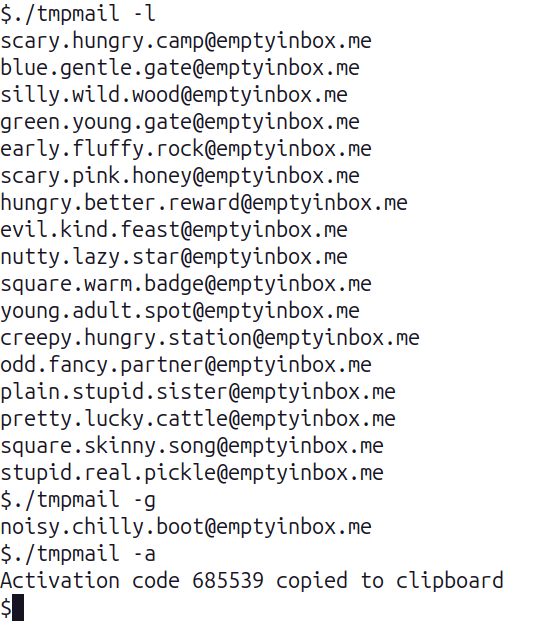
Web inbox
Prefer a UI? Sign in with a passkey to see every inbox, with codes and links pulled out of each message and a copy button next to them.
Open the web inbox

Guides
Working setups for the places people actually need an inbox.-
Playwright email testing
A fixture per test, no fixed sleeps, safe under parallel workers.
-
Cypress email testing
Two custom commands on cy.request. No plugin required.
-
n8n verification codes
Three HTTP Request nodes and a Wait node, no code node.
-
LangChain agent inbox
Three Python tools, with the polling loop inside the tool.
-
All use cases
Every setup guide, including Claude via MCP and ChatGPT Actions.
-
Comparisons
How this compares to MailSlurp, Mailinator, Mailosaur and mail.tm.